Burning discs today
CDBurnerXP is a free disc authoring and burning tool that belongs to a category of software many people no longer think about daily, yet still rely on when needed. It is built for creating CDs, DVDs, Blu-ray discs, and ISO files, offering a full set of features without requiring payment.
Top Recommended Alternative

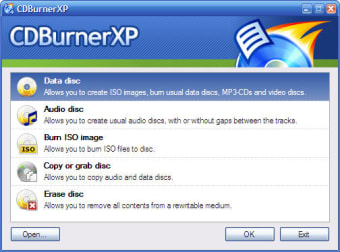
CDBurnerXP stays focused on doing traditional disc tasks well. The interface reflects that purpose, with a classic Windows layout that organizes tasks into clear categories like data discs, audio discs, and ISO burning. It feels familiar immediately, especially for users who have used older burning software before.
A simple disc burning application
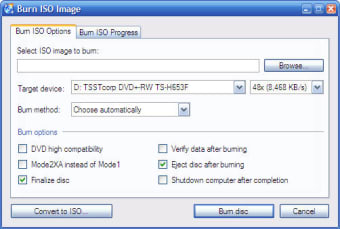
With CDBurnerXP, users select the type of project, add files, and proceed through a straightforward process that leads to burning a disc or creating an image. This creates a straightforward burning process that avoids unnecessary complexity. The software supports data discs for file storage, audio discs for music playback, and bootable discs for system use. It also allows ISO creation and burning.
What keeps CDBurnerXP relevant is its versatility. It handles multiple disc formats, supports verification after burning, and allows customization of disc settings depending on the project. This gives it a multi-format support system that still holds value in environments where physical media is required, such as backups, archival storage, or legacy systems. The limitation comes from how rarely these tasks are needed today.
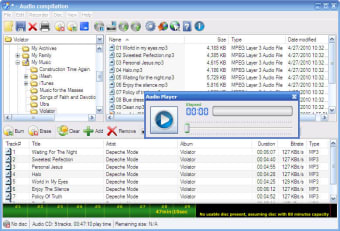
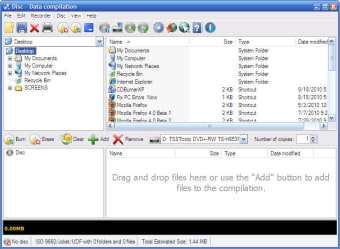
The graphical interface stays consistent with its purpose. It uses a structured layout with file explorers, project windows, and progress indicators that clearly show what is happening. The design feels functional rather than modern, which works because the tasks themselves are technical and process-driven. At the same time, the design can feel dated compared to newer applications, and it does not guide new users as much as more modern tools might.
A reliable burner that keeps old-school disc tasks accessible
CDBurnerXP remains useful because it handles disc burning with clarity, flexibility, and very little fuss. Its support for data, audio, bootable discs, and ISO work makes it a dependable tool for users who still need physical media for backups, archives, or legacy systems. While its dated design reflects an older era of software, it still succeeds by staying practical, capable, and easy enough to trust once you know what you need.
CDBurnerXP is a renowned program among recording applications; an excellent tool for burning different types of discs and working with ISO files.
Among the features in CDBurnerXP you’ll find tools to burn data discs, music discs, ISO images and also copy discs all from your memory stick, without leaving any trace on the host computer. All of these options are conveniently organized in a tool menu – the main screen you seen when running CDBurnerXP.
Each button in this launch menu opens the corresponding application in a separate window. From then on, the recording process follows the standard procedure: select data to burn, press the Record button, tweak burning settings and you're done. CDBurnerXP supports CD, DVD (including HD-DVD) and also Blu-Ray discs.
The only downside to CDBurnerXP is the fact that the main screen closes every time you choose a burning task, so if you want to switch from erasing a disc to burning something else on it, you’ll have to start CDBurnerXP twice.
CDBurnerXP is a powerful burning tool that lets you create music and data discs, burn ISO images, copy discs and more.
Updated DVD-Video burning capability: Simplifies burning video DVDs a little and in particular shows this functionality in the startup screen New MSI installer (based on WiX) with better deployment capabilities Important here: Remove any previous version of CDBurnerXP before using the new MSI installer